
How to Pay CP500 in MyTax: Complete Step-by-Step Guide for Malaysian Taxpayers

How to Pay CP500 in MyTax: Complete Step-by-Step Guide for Malaysian Taxpayers
Managing tax payments is very important for people who have their businesses in Malaysia. How to pay CP500 in Mytax instalment scheme helps taxpayers pay their income tax little by little throughout the year. This way they do not have to pay an amount all at once. In this guide we will show you how to pay CP500 in MyTax. We want to make sure you can pay your taxes smoothly, accurately and on time.
What is CP500 and Who Needs to Pay It?
CP500 is for people who earn money from their businesses like sole proprietorships or partnerships. The Inland Revenue Board or LHDN sends CP500 notices to taxpayers based on how tax they paid the year before.
When you get a CP500 notice you need to:
- Pay tax every two months
- Pay the amount stated in the notice
- Make sure you pay before the date
If you do not pay on time you might have to pay extra money as a penalty.
Why Should You Use MyTax to Pay CP500?
MyTax portal is the website for tax-related services provided by LHDN. Using MyTax is an idea because it is:
- Convenient: You can pay anytime and anywhere
- Accurate: It is connected to your tax account so you can be sure everything is correct
- Up-to-date: You can see the status of your payment away
- Secure: Your transactions are safe
What You Need to Do Before Paying CP500 in MyTax
Before you start make sure you have:
- MyTax account login details
- CP500 instalment notice
- Access bank account (with FPX)
- A stable internet connection
Step-by-Step Guide: How to Pay CP500 in MyTax
Step 1: Log in to the MyTax Website
- Go to the MyTax portal. Click on "Login". Enter your:
- Identification number (IC or Passport or Business Registration Number)
- Password
- Complete the security check
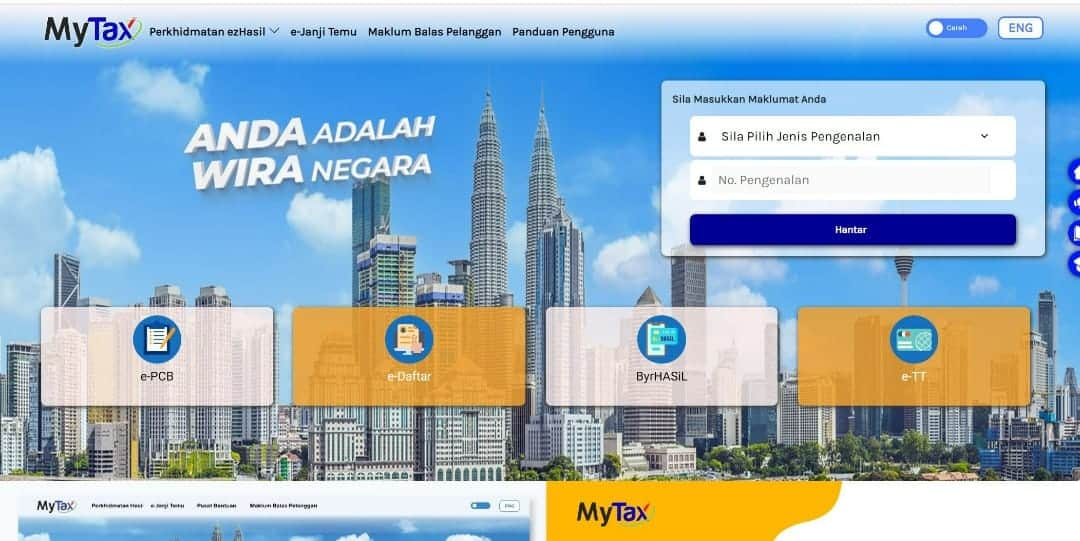
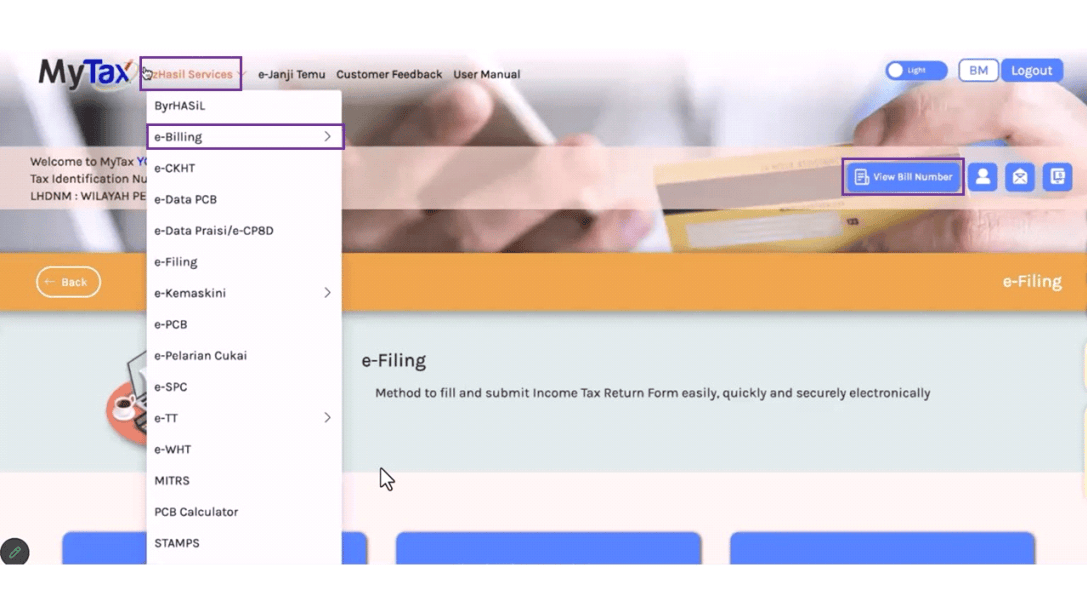
Step 2: Go to the Payment Section
After you log in go to "ezHasil Services" and select "e-Billing". Then choose "Payment Services". This is where you can manage all your tax payments, including CP500.
Step 3: Choose CP500 Payment Type
Select "Income Tax". Then choose "CP500 Instalment Payment". Make sure your tax identification details are correct.
Step 4: Check Your Instalment Details
The system will show you:
- How much CP500 you still need to pay
- Which instalment is due now
- The due date
Make sure all these details match your CP500 notice before you proceed.
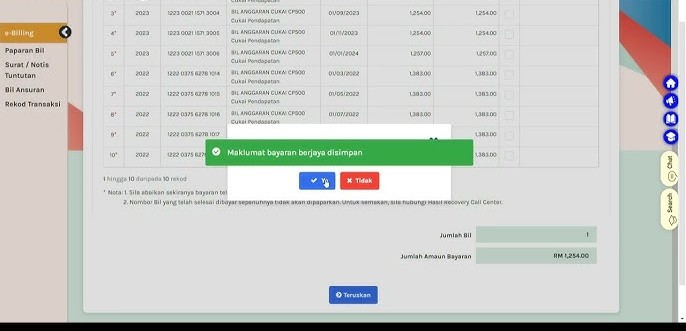
Step 5: Choose How You Want to Pay
MyTax allows you to pay in ways:
- FPX (online banking). This is the common way
- Credit or debit card (if available)
- Other approved channels
Choose the method you prefer and proceed.
Step 6: Pay Using FPX
If you choose FPX, select your bank. Click "Proceed". Log in to your online banking portal. Authorize the payment. Once you are done you will be taken back to MyTax.
Step 7: Save Your Payment Receipt
After you pay successfully. Print the official receipt. Keep it for your records. In case you need it for an audit.
CP500 Payment Schedule and Deadlines
We have to follow the payment plan carefully. The CP500 payment plan requires us to make payments every two months
For example:
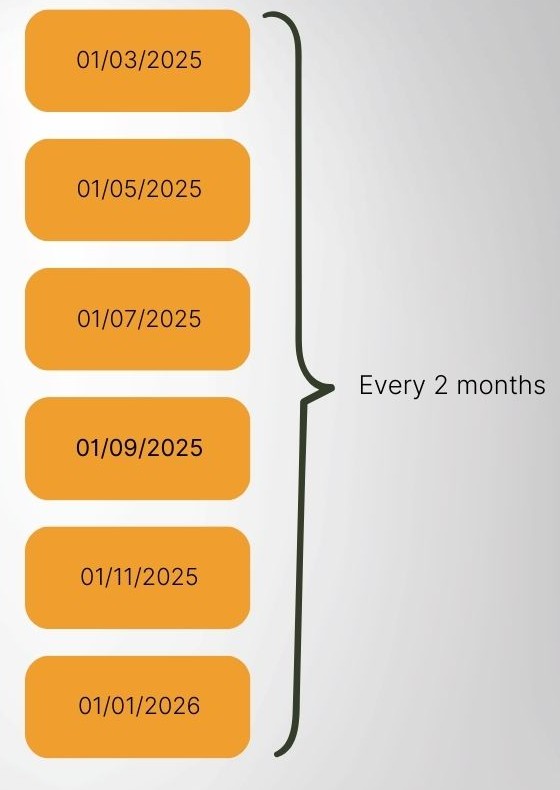
Late payments may incur a 10% penalty.
Common Mistakes to Avoid When Paying CP500
To ensure we comply with the rules we must avoid making these mistakes:
- Missing the dates
- Choosing the payment option, such as selecting the wrong tax type
- Paying less than the instalment amount
- Not keeping proof of payment
- Being accurate is crucial to prevent unnecessary problems.
How to Check CP500 Payment Status in MyTax
To confirm your CP500 payment:
1. Log in to MyTax
2. Go to e-Lejar
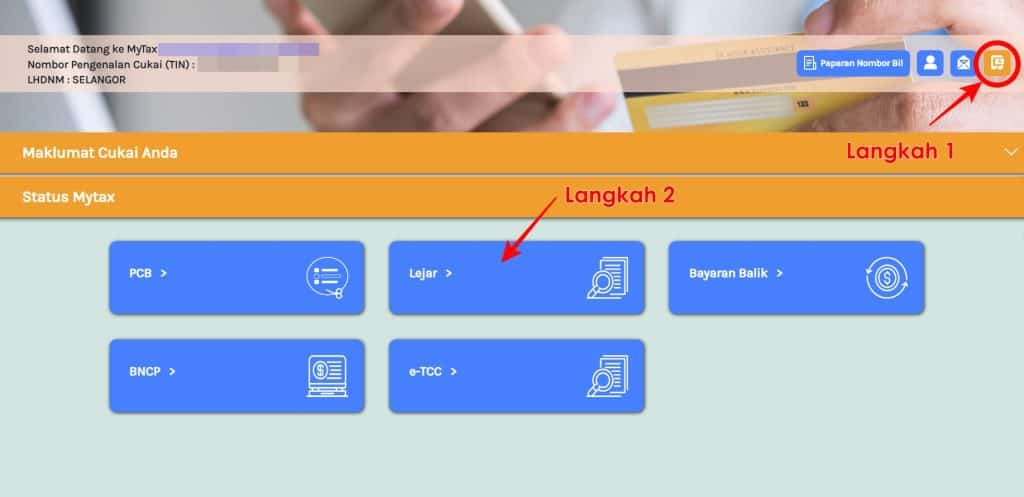
3. Review:
- Payment history
- Outstanding balance
This ensures all our CP500 payments are properly recorded.
What to Do If You Need to Revise CP500 Instalments
If our income changes significantly we can:
- Submit a CP502 form
- Change the instalment amounts to match our income
This helps us avoid overpaying or underpaying CP500.
Alternative Methods to Pay CP500
Besides using MyTax we can also pay CP500 via:
- Bank counters
- ATM machines
- Cheque submission to LHDN
- Authorized collection agents
However, using MyTax is still the most efficient way to pay CP500.
Penalties for Non-Payment of CP500
Non-compliance leads to:
- A 10% penalty on the CP500 instalment
- An additional 5% surcharge if the CP500 is still unpaid after receiving a notice
Paying CP500 on time is essential to avoid penalties.
Best Practices for Managing CP500 Payments
To manage our CP500 payments smoothly:
- Set reminders for CP500 dates
- Keep all CP500 payment receipts organized
- Regularly review our income projections for CP500
- Adjust CP500 instalments when necessary
Consistency ensures we stay compliant with CP500 and avoid penalties.
At HL Khoo Group, we provide comprehensive tax compliance and advisory services to ensure your CP500 instalments are accurate and submitted on time. Whether you require assistance with MyTax payments, CP500 revisions (CP502), or overall tax planning, we are here to support you every step of the way.
FAQ
Yes, early payment is allowed and helps avoid missing deadlines.
A 10% penalty will be imposed on the unpaid amount.
Yes, we can pay in advance or settle multiple instalments in one transaction.
No, it only applies to individuals with business income assessed by LHDN.
Apr 02,2026